
The Physician’s Guide to Building a Simple AI Workflow
This post may contain links from our sponsors. We provide you with accurate, reliable information. Learn more about how we make money and select our advertising partners.
Most physicians don't need another app.
They don't need another dashboard, another productivity system, or another tool promising to “change everything.” What they actually need is pretty boring by comparison: a faster way to get through the low-leverage work that quietly chews up their days.
Not patient care. Not anything clinical. The other stuff.
Meeting requests. Committee follow-ups. Scheduling questions. Messages that aren't urgent, aren't interesting, but still require you to stop, read, think, decide, and respond. Individually, each one takes maybe two minutes. Collectively, they can steal hours a week without you noticing until you look up and wonder where the afternoon went.
AI can help with that. Not as a magic system that runs your life, but as something closer to a first-pass assistant for the administrative clutter that surrounds medicine.
This article walks through one concrete example: how to build a simple, repeatable workflow for processing non-clinical administrative messages. By the end, you'll have a framework you can actually use, not just think about using.
Disclaimer: While these are general suggestions, it's important to conduct thorough research and due diligence when selecting AI tools. We do not endorse or promote any specific AI tools mentioned here. This article is for educational and informational purposes only. It is not intended to provide legal, financial, or clinical advice. Always comply with HIPAA and institutional policies. For any decisions that impact patient care or finances, consult a qualified professional.

A Prompt Isn't a Workflow
A lot of physicians have already poked around with AI. ChatGPT, Claude, Gemini, Copilot — most people have tried at least one of them, asked it something, gotten a decent answer, and then… not really integrated it into anything.
That's the gap.
A one-off prompt is just a Google search with extra steps. A workflow is something you can run again next week and the week after, on a different message, and get roughly the same quality of output.
That distinction is where the time savings actually come from.
If you use AI once to draft a response, you save five minutes. If you use the same process every Monday to clear your inbox backlog, you save an hour a month. Maybe more.
The tasks best suited for this are ones that happen often, follow a similar pattern, and don't require you to be the one doing the initial organizing. Administrative messages are a natural starting point.
AI Workflow Example: Processing Non-Clinical Admin Messages
Here's the setup.
You're a physician with a full schedule. Between patients, you're getting messages from colleagues, committees, staff, schools, vendors, professional groups, side projects. Some need a quick reply. Some need to be delegated. Some need more information before you can do anything. Some don't need a response at all.
The problem isn't any single message. It's the decision loop each one creates.
What's this actually asking? Is it urgent? Do I need to respond, or can someone else handle it? What should I say?
That loop doesn't feel like much in isolation. But run it fifteen times a day and it becomes exhausting.
The workflow has one job: take a non-clinical administrative message and return a clear summary, a recommended next step, and a draft reply. You still review everything, make the final call, and edit before sending. But you're not starting from a blank page anymore.
Step 1: Get Specific
The first mistake people make with AI is starting too broad.
“Help me be more productive” doesn't work. Neither does “help me with my inbox.”
What works is something like: “Help me process non-clinical administrative messages so I can understand the request, figure out what to do next, and draft a response faster.”
That's specific enough to build around. It tells the AI what it's working with, what output you want, and what it shouldn't touch.
Getting narrow at the start isn't a limitation. It's how the workflow actually works.
Step 2: Keep It Low-Risk
Before any of this: do not paste protected health information into a general AI tool. No patient names, no dates of birth, no medical record numbers, no clinical details, nothing that could identify a patient.
This workflow is explicitly for ordinary administrative communication. Meeting requests, committee follow-ups, scheduling questions, speaking invitations, networking emails. You can get real time savings without going anywhere near sensitive information.
If you're working with something confidential, legal, or HR-related, use an approved tool in an approved environment, or handle it manually. Understanding AI legal safety before you build any workflow will save you from costly surprises down the road.
Step 3: Build a Reusable Prompt
This is where most people underengineer.
They paste a message into AI and write “can you help me respond to this?” Sometimes that produces something useful. More often it produces something generic that still requires significant editing.
A reusable prompt takes two extra minutes to write once and saves you from reinventing the wheel every time.
Here's a version that works:
You are helping a busy physician process non-clinical administrative messages. I will paste one message below. Do not assume any patient-specific information. Do not make final decisions for me. Your job is to organize the message so I can respond faster.
For each message, provide: a short summary, what the sender is asking for, any deadline, urgency level, whether this can be delegated, the recommended next step, and a draft reply under 100 words in a professional but warm tone.
Here is the message: [paste here]
The structure matters. You're giving AI a role, a constraint, and a clear output format. Each of those reduces variability in the response.
If you want a faster starting point, the ChatGPT prompt cheat sheet covers formats that translate directly into this kind of admin workflow.
What This Actually Looks Like
Say you receive this:
“Hi Dr. Smith, we're finalizing the schedule for next month's physician leadership meeting and wanted to see if you'd be available to give a 10-minute update on your department's current priorities. The meeting is tentatively set for Thursday at 5 PM, but we may shift it depending on availability. Could you let us know by Friday?”
That message isn't complicated. But it still requires you to stop, parse what they're asking, check your calendar, think through whether you're the right person, and write something back.
With the workflow, AI processes it like this:
Summary: Request for a 10-minute department update at next month's leadership meeting, Thursday at 5 PM. Deadline: Friday. Urgency: medium. Delegation potential: someone else can prepare the department priorities document, but you need to confirm your own availability.
Draft reply: “Thanks for reaching out. Happy to contribute if the timing works. I'll confirm my availability for Thursday at 5 PM and get back to you before Friday. If it works, I can put together a brief update on our current priorities.”
Not revolutionary. Just useful.
You didn't write that from scratch. You read it, decided it was accurate, adjusted one word, and moved on. The message is handled. The mental loop is closed.
That's how AI saves time in real life. Not through dramatic transformation, but through small frictions removed repeatedly.
Step 4: Add Your Preferences
After you've tested the basic version a few times, make it yours.
You might want every draft reply to stay under 100 words. You might want AI to flag anything that requires your personal judgment rather than just guessing at an answer. You might want a specific tone, or a note anytime the task should be delegated to a coordinator.
These rules help the AI produce outputs that actually sound like you and work within your actual preferences.
Updated version of the prompt:
You are helping a busy physician process non-clinical administrative messages. Do not make final decisions for me. Do not include or assume patient-specific information.
Rules: suggest delegation when the task is mainly scheduling or coordination. Flag ‘physician decision needed' when my judgment is genuinely required. Mark urgency as low if there is no clear deadline. Keep replies under 100 words. Use a professional but warm tone. Do not commit me to anything unless I explicitly say yes.
For each message: summary, request, deadline, urgency, recommended next step, draft reply.
Here is the message: [paste here]
At this point, you're not just using AI. You're training a process.
Step 5: Make It a Habit, Not an Experiment
The workflow only sticks if it fits into your schedule.
Don't try to use it for every message the moment it arrives. That creates more context-switching, not less.
Instead, pick two or three admin blocks per week. Monday to clear weekend messages. Wednesday to handle anything unresolved. Friday to close open loops before the weekend. Run the workflow in batches.
Over time, you'll notice that messages fall into familiar categories: quick reply needed, needs a calendar check, can be delegated, needs more information, no response required. Once those patterns become visible, you can start organizing around them. Nothing complicated. A few labels in your inbox, maybe a folder system.
The first couple weeks, just track one thing: are the draft replies usable enough to reduce the time it takes you to respond? If the answer is yes, keep going.
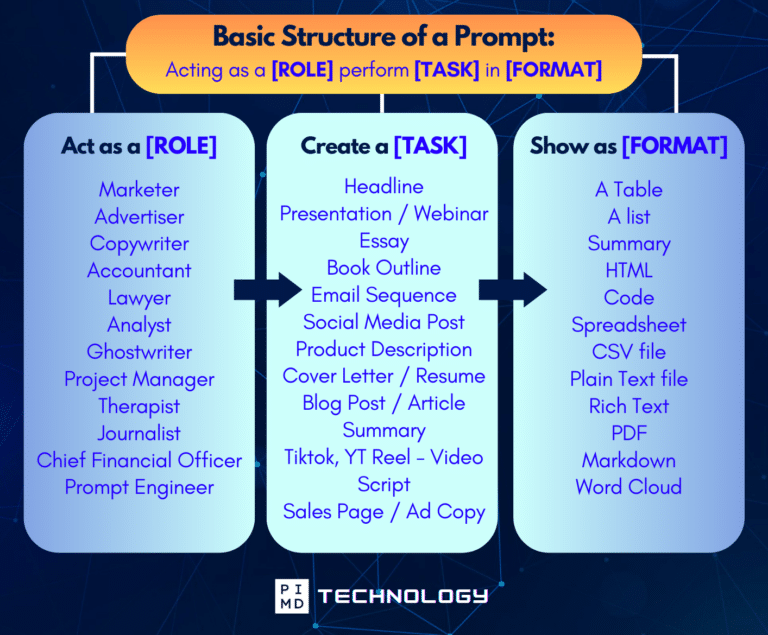
Unlock the Full Power of ChatGPT With This Copy-and-Paste Prompt Formula!
Download the Complete ChatGPT Cheat Sheet! Your go-to guide to writing better, faster prompts in seconds. Whether you're crafting emails, social posts, or presentations, just follow the formula to get results instantly.
Save time. Get clarity. Create smarter.
What to Look For Next
Once one workflow is running, it becomes easier to spot others.
The question isn't “how can AI fix my workday?” It's “what's one thing I do every week that AI could help me start, sort, summarize, or draft?”
For some physicians, that's meeting notes. For others, it's monthly reports, template emails, or turning rough notes into a structured agenda. Writing, summarizing, and organizing are where today's AI tools are most consistent.
If you want to see the bigger picture of where this leads, AI skills for physicians and how to stay competitive is a useful read alongside building your first workflow.
Physicians looking to go further are also starting to explore AI side hustles that convert these same workflow skills into additional income streams, worth knowing exists even if you're not ready for it yet.
Keep the scope narrow. One task, one workflow, two weeks of testing.
If it works, it works. Build the next one from there.
The Bottom Line
AI doesn't become useful until it connects to something specific you actually do.
The workflow in this article handles one narrow thing: non-clinical administrative messages. It helps you understand what's being asked, figure out the next step, and draft a reply without starting from scratch every time.
Your judgment still drives everything. You review the output. You protect patient privacy. You decide what gets sent.
But you're no longer treating each message like a blank-slate problem.
That's the real value here. Not transformation. Not automation. Just a repeatable process that removes a small amount of friction, week after week, until you've reclaimed enough time to notice.
Start with one task. Run it for two weeks. Go from there.
At Passive Income MD, we cover practical AI workflow tips for physicians who want to reduce administrative drag and protect more time for the work that actually matters.
Download The Physician’s Starter Guide to AI – a free, easy-to-digest resource that walks you through smart ways to integrate tools like ChatGPT into your professional and personal life. Whether you're AI-curious or already experimenting, this guide will save you time, stress, and maybe even a little sanity.
Want more tips to sharpen your AI skills? Subscribe to our newsletter for exclusive insights and practical advice. You'll also get access to our free AI resource page, packed with AI tools and tutorials to help you have more in life outside of medicine. Let’s make life easier, one prompt at a time. Make it happen!
Disclaimer: The information provided here is based on available public data and may not be entirely accurate or up-to-date. It's recommended to contact the respective companies/individuals for detailed information on features, pricing, and availability. All screenshots are used under the principles of fair use for editorial, educational, or commentary purposes. All trademarks and copyrights belong to their respective owners.
If you want more content like this, make sure you subscribe to our newsletter to get updates on the latest trends for AI, tech, and so much more.
Further Reading
Disclaimer: The topic presented in this article is provided as general information and for educational purposes. It is not a substitute for professional advice. Accordingly, before taking action, consult with your team of professionals.